---
title: 8.x release notes for 2020
product: Unity Version Control
canonical: https://docs.unity.com/en-us/unity-version-control/release-notes/8/2020
last_updated: 2026-11-04
generated_at: 2026-11-22T19:03:52.394Z
locale: en-us
---
# 8.x release notes for 2020
> Review the 2020 release notes for version 8 of Unity Version Control.
This page contains the Unity Version Control 8.x releases published in 2020, organized from newest to oldest. For other years, refer to [8.x release notes](../8).
## 8.0.16.4054
> **Note:**
>
> **Public** | 2020-03-09
### New
#### All platforms - Command line client
All platforms - Command line client: `cm ls` is now about 20 times faster!
The command was retrieving the branches where each item was modified for the last time one by one. Now it batches requests.
In our internal tests, retrieving the biggest tree we have goes down from 190 seconds to just 10 (19 times faster!).
```text
> cm ls / --tree=264526ea-eae6-407d-ba24-e3fcb646d7ee@codice@ourinternalserver.com:9090 -R
```
### Bug
#### All platforms - Gluon
All platforms - Gluon: After switching to a branch in an empty workspace using Gluon, if the workspace had xlinks, when trying to download a single file failed with an unexpected error. Now it's fixed.
#### Windows - Plastic
Windows - Plastic: When moving the mouse really close to the top, over the comments bar in the CodeReview window, sometimes the following error appeared:
```text
Specified argument was out of the range of valid values. Parameter name: lineIndex
```
Now it's fixed!
***
## 8.0.16.4048
> **Note:**
>
> **Public** | 2020-03-05
### New
#### All platforms - Server
All platforms - Server: We added a new subcommand called `conns` to the `plastid shell` command. It displays all the network connections for a specific Plastic SCM server instance.
#### All platforms - Server
All platforms - Server: The user management command line tool, `umtool`, is now available as a subcommand of `plasticd shell`.
To manage your users and groups, you can now run:
```console
c:\> plasticd umtool
```
The arguments to umtool remain unchanged. You can learn more about the umtool command line options in the [online documentation](https://www.plasticscm.com/documentation/administration/plastic-scm-version-control-administrator-guide).
#### All platforms - Server
All platforms - Server: We added detailed shutdown times of each component and better logs to the activity scheduler.
We added new logs to have more precise tracking while improving tests performance, but we think they are good logs to stay.
```text
DEBUG Daemon - Cleanup done in 47 ms
```
We also added logs to track scheduled activities as follows:
```text
2020-02-26 16:27:41,490 ActivitySchedulerThread (null) DEBUG ActivityScheduler - Run [Transaction manager] 0 ms. (Runs every 2 min)
2020-02-26 16:27:41,491 ActivitySchedulerThread (null) DEBUG ActivityScheduler - Run [Reload config files] 0 ms. (Runs every 2 sec)
2020-02-26 16:27:43,494 ActivitySchedulerThread (null) DEBUG ActivityScheduler - Run [Reload config files] 0 ms. (Runs every 2 sec)
2020-02-26 16:27:45,495 ActivitySchedulerThread (null) DEBUG ActivityScheduler - Run [Reload config files] 0 ms. (Runs every 2 sec)
```
#### All platforms - All clients
All platforms - All clients: We added trace information when a workspace returns to cs:0.
When a workspace gets resetted (it points again to cs:0 and all files appear as private), Plastic SCM clients will now leave a trace of what happened in the workspace `.plastic` directory as new log files (without needing any extra log configuration).
This applies to all clients (Plastic, Command Line Client, Gluon, Visual Studio Package, Shell Extension, etc) so regardless of which one of them resets the workspace, it will leave detailed log of what and why happened.
The names of these log files look like `wkcorruption.2020.02.02.13.15.26.352.log` & `wkmismatch.2020.02.02.13.15.26.352.log`, where the numbers are a timestamp.
#### All platforms - all products (logging)
All platforms - all products (logging): We added a daily rolling file appender. It does what you expect by its name - a new log file for each day's logs. You can also set a maximum number of files to keep on disk.
To configure this log appender, add something like the following to your "log.conf" files.
```text
```
This will generate files like: `2020-02-27-cm.debug.log.txt`, `2020-02-28-cm.debug.log.txt` and so on.
Parameter `maxFileCount` is the maximum number of files to keep on disk. The oldest log files in the directory will be deleted to maintain this limit.
#### All platforms - Plastic
All platforms - Plastic: we improved the text of the merge resolution menu options to make what's going on clearer. In particular, the options for a "merge to..." operation no longer mention the workspace (because there is no workspace involved in a "merge to" operation!).
### Bug
#### All platforms - Plastic
All platforms - Plastic: In some scenarios, the combo to select a Plastic SCM repository when creating a workspace in the Welcome screen could be duplicated. Now it's fixed.
#### Windows - Gluon
Windows - Gluon: When using the "Search files" functionality in the "Explore workspace" view, if there was activity on disk in the workspcace folder, Gluon was not able to correctly focus the selected file. Now it's fixed (special thanks to Greg Koreman for reporting this!).
#### Windows - Plastic
Windows - Plastic: Sometimes the GUI lost the expanded and selected nodes in the Workspace Explorer if you clicked the refresh button repeatedly. Now it's fixed.
***
## 8.0.16.4024
> **Note:**
>
> **Public** | 2020-02-28
### New
#### All platforms - .NET Core Server
All platforms - .NET Core Server: Our brand new, .NET Core-based Plastic SCM server received new superpowers! Now it has the WebAdmin and WebUI available - and DevOps (mergebots)! (Unless you run it on macOS, where we still didn't enable the mergebots).
#### All Platforms - Server
All Platforms - Server: You can now run the Plastic proxy as a subcommand "`proxy`" of `plasticd`.
What is the Plastic proxy? See here: [https://www.plasticscm.com/documentation/administration/plastic-scm-version-control-administrator-guide#Chapter4:Usingaproxyserver](https://www.plasticscm.com/documentation/administration/plastic-scm-version-control-administrator-guide#Chapter4:Usingaproxyserver)
Usage:
The arguments to "`plasticd proxy`" are exactly the same as for "`plasticcached`":
```console
C:\PlasticSCM\server> plasticd proxy --installservice
Installing service Plastic Proxy...
Service Plastic Proxy has been successfully installed.
Creating EventLog source Plastic Proxy in log Application...
Service correctly installed
C:\PlasticSCM\server> plasticd proxy --start
Server started
C:\PlasticSCM\server> plasticd proxy --stop
Server stopped
C:\PlasticSCM\server> plasticd proxy --uninstallservice
Removing EventLog source Plastic Proxy.
Service Plastic Proxy is being removed from the system...
Service Plastic Proxy was successfully removed from the system.
Service correctly uninstalled
```
#### Windows - Plastic
Windows - Plastic: The Plastic client periodically checks the license on the server, and if doesn't find any license, it shows an appropriate warning message in the notification area. Sadly, failing to connect to the server would also produce the same message, even if a license did exist, which was confusing.
We fixed this. Now, if the client can't connect to the server, it tells you it can't connect. If it connects and finds that there is no license, well, it tells you that you have no license.
#### macOS - Plastic
macOS - Plastic: The new Code Review system for macOS is no longer an experimental feature! We removed the warning panel in the top of the Window saying that. However, the feature is still recent, so do not hesitate to report any possible problem to `support at codicesoftware dot com`.
### Bug
#### All platforms - Plastic, Gluon (Cloud Edition)
All platforms - Plastic, Gluon (Cloud Edition): This release has a known bug that causes repositories to appear duplicated during the configuration steps. This bug is not critical, is just a graphical nuissance when selecting the repository you want to join. It will be fixed in the upcoming releases.
***
## 8.0.16.4017
> **Note:**
>
> **Public** | 2020-02-27
### New
#### All platforms - .NET Core Server
All platforms - .NET Core Server: Great news! We just published the Plastic SCM server built on .NET Core, the cross-platform, rock-solid, super-fast and officially supported framework.
The new servers are available for Linux, macOS and Windows since version 8.0.16.4017.
The new servers are fully compatible with your current installation but as of 8.0.16.4017 they still don't include WebAdmin, WebUI and mergebots. We'll release a new version packaging those soon.
The Linux servers are available as tar.gz and also regular packages.
Windows and macOS servers are only available as zip and tar.gz at this point. We'll make them full regular installers soon.
#### All platforms - Server
All platforms - Server: We introduced a buffer pool for the network buffering.
Now Plastic Protocol takes advantage of a buffer pool and larger buffers (2MB) when reading from and writing to the network, which speeds up operations when sending lots of metadata.
#### All platforms - Server
All platforms - Server: We added extra logs and a list of active connections.
Added a new log to Plastic Proto (only when it runs standalone without remoting) to track socket accepts:
```text
conn 1231. port 8088. Connection accepted from [33.41.xx.xx]
```
Also, added a new command (`conns`) to `plasticd --console` shell and extra info to the ServerStats log that prints the active connections:
```text
NETWORK CONNECTIONS
id port from status since alive requests
3 127.0.0.1:8084 127.0.0.1 Active 00:00:01 00:00:04 2
4 127.0.0.1:8084 127.0.0.1 Active 00:00:00 00:00:03 2
5 127.0.0.1:8084 127.0.0.1 Active 00:00:02 00:00:02 1
6 127.0.0.1:8084 127.0.0.1 Active 00:00:01 00:00:01 1
Total connections: 4
```
Total connections is redundant with the former:
```text
ACTIVE CLIENT CONNECTIONS
```
In the log.
The counter shows all the open socket connections, whether they are waiting or actively used.
Also, added an extra security setting: If SSL stays being negotiated more than 10 secs, the conn will be aborted.
#### All platforms - Server
All platforms - Server: We added a new shell that lets you interact with locally running `plasticd` processes. Yes! This is particularly useful when the Plastic SCM Server is running as a daemon, in which case you couldn't interact with it.
Probably best explained with some examples:
To start the shell:
```console
C:\path\bin\server>plasticd shell
Found 2 servers running:
1. MY_LAPTOP:8084
2. MY_LAPTOP:8085
Please choose a server [1-2]: 2
Connecting to MY_LAPTOP:8085
MY_LAPTOP:8085>
```
Of course, if there were only one, it would have connected to it directly.
To see the list of available commands:
```console
MY_LAPTOP:8085> help
Shell commands:
help Shows this help
connect Connect to an active server
exit Exit the shell
Server commands:
'gcinfo' shows info about garbage collection
'procinfo' shows process info
'gc' runs garbage collector
'collect' runs GC.Collect
'stats' shows network stats
'cleancaches' cleans all caches
'showcaches' shows info about all caches
'perfcounters' shows the available perf counters
'showmethodlist' shows active requests
'netpause' pauses the network connections - current connections are broken and new ones rejected
'netrestart' restarts the network connections
'shutdown' performs a controlled stop, first stops accepting new requests, then waits for all requests to finish
MY_LAPTOP:8085>
```
For example:
```console
MY_LAPTOP:8085> gcinfo
GARBAGE COLLECTOR USAGE
======= ================
GC-Gen0 1
GC-Gen1 0
GC-Gen2 0
GC total memory 05.19 Mb
MY_LAPTOP:8085>
```
Switch to my other server, and shut it down:
```console
MY_LAPTOP:8085> connect
Found 2 servers running:
1. MY_LAPTOP:8084
2. MY_LAPTOP:8085
Please choose a server [1-2]: 1
Connecting to MY_LAPTOP:8084
MY_LAPTOP:8084> shutdown
Shutting down server...
OK
Connecting to MY_LAPTOP:8085
MY_LAPTOP:8085>
```
And end scene:
```console
MY_LAPTOP:8085> exit
C:\path\bin\server>
```
### Bug
#### All platforms - Plastic, Gluon (Cloud Edition)
All platforms - Plastic, Gluon (Cloud Edition): This release has a known bug that causes repositories to appear duplicated during the configuration steps. This bug is not critical, is just a graphical nuissance when selecting the repository you want to join. It will be fixed in the upcoming releases.
#### Windows - Plastic
Windows - Plastic: When editing the path permissions for a repository that is not the workspace active one, the dialog allowed to choose folders for the currently active repository instead of the one that was selected. That was wrong and now it's fixed.
#### Windows - Plastic
Windows - Plastic: After refreshing the Repository browser view (the view that shows the files in a branch, label or changeset), the expanded and selected nodes were lost. Now it's fixed.
***
## 8.0.16.3986
> **Note:**
>
> **Public** | 2020-02-22
### New
#### Command line client
Command line client: updated the "cm undo" inline help to explain the current limitation regarding reverting file deletions. Namely, to undo a deletion, you must either specify the full path of the item, or specify the containing directory and use the recursive ("-r") flag.
For example,
```console
$ cm undo .
```
(Does NOT undo deletions in the current directory.)
```console
$ cm undo . -r
```
(Undoes all deletions (and other changes) in the current directory recursively.)
```console
$ cm undo src/file.txt
```
(Undoes deletion (or other change) of src/file.txt.)
#### All platforms - Gluon
All platforms - Gluon: Perhaps you noticed that private items you chose to add in the Workspace Explorer turned into controlled for a short while, then eventually they appeared as Added (as one would expect). This happened in big repositories, since the GUI takes longer to calculate the status and size information.
Right after refresh, the tree could only know whether an item was private or not. That's why you saw added items displayed as controlled. It's kind of confusing, though; that's why it's fixed now!
### Bug
#### All platforms - Plastic
All platforms - Plastic: We improved the search buttons behavior in the branch explorer. Previously, those didn't focus any matching changeset, label or branch -even if they were visible- when you toggled the "Only relevant" option. Now it's fixed.
#### Windows - VSPackage
Windows - VSPackage: Visual Studio crashed after checking-in files from the Pending Changes view. Now it's fixed.
#### Linux - Server
Linux - Server: Fixed a wrong message during server shutdown.
Often we saw a wrong message during server shutdown like this:
```text
plasticd --console
plasticd daemon up. 1.0.0.0 672 ms startup time
Object reference not set to an instance of an object.
```
Hopefully it won't happen again.
***
## 8.0.16.3975
> **Note:**
>
> **Public** | 2020-02-13
### New
#### All platforms - Gluon
All platforms - Gluon: Gluon now properly handles file system permissions (`r-xr-xr-x`). This was available only in the Plastic client until today!
The client will set the permissions on disk during the update and configure operations. Also, the checkin operation will save the changes you might do to them.
This improvement applies to '`cm partial`' commands as well.
#### All platforms - Plastic
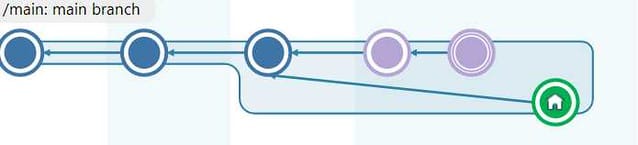
All platforms - Plastic: The Incoming Changes feature doesn't support the sub-branches. Before these changes, you weren't explicitly notified about this scenario. Now, Plastic will detect this situation and it will let you know that you need to perform a merge to get the head changes.
What is a sub-branch, then? We call "sub-branches" the situation that happens when a single branch has more than one line of changesets evolving in parallel. This scenario is often seen when working on distributed mode. Let's say there are 2 developers, John and Kate, who have workspaces pointing to the same branch. They checkin new changes each one in their server, and eventually, John pulls Kate's changes. They'll end up having something like this:
**Screenshot:**
#### All platforms - Plastic
All platforms - Plastic: The Incoming Changes feature doesn't support workspace with transformer rules. Before these changes, you weren't explicitly notified about this scenario. Now, Plastic detects this situation and it lets you know the steps you need to do to get the head changes.
#### All platforms - Plastic
All platforms - Plastic: The Incoming Changes feature doesn't support a writable Xlink edited to point to a previous changeset. Before these changes, you weren't explicitly notified about this scenario. Now, Plastic detects this situation and it lets you know the steps you need to do to get the head changes.
#### Windows - Gluon
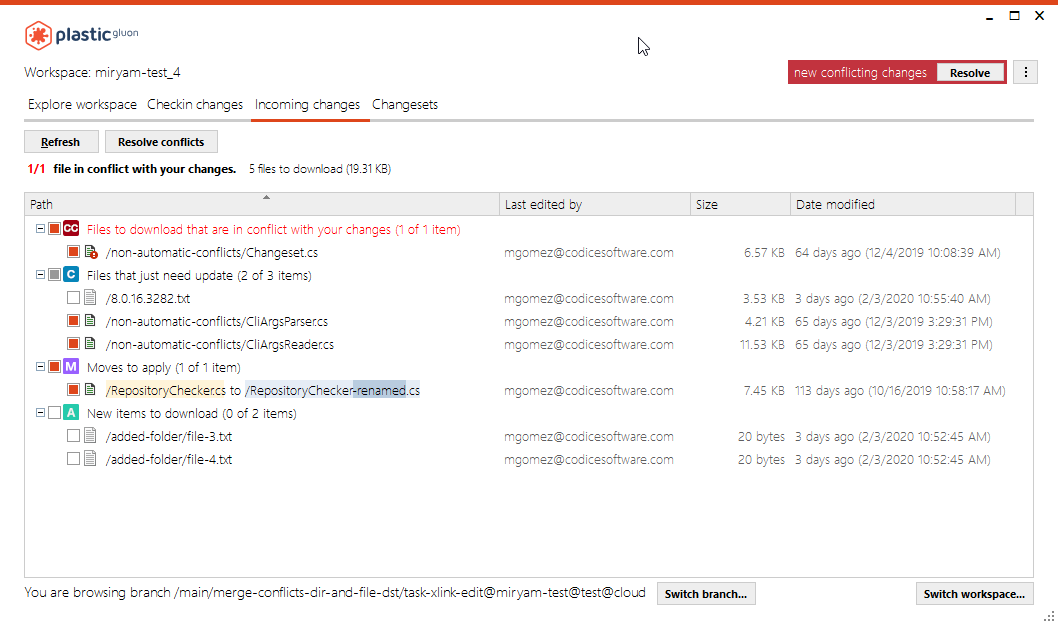
Windows - Gluon: Incoming changes: The incoming changes view now allows you to check the items to update/resolve instead of obtaining all incoming changes.
**Screenshot:**
#### All platforms - Command line client
All platforms - Command line client: calling `cm workspace` with the wrong number of arguments now shows the help for the `workspace` command, rather than the `workspace create` subcommand.
#### All platforms - Server
All platforms - Server: We optimized the performance checking the security of a query or a branch explorer.
Checking the security of 13000 branches:
* Before: It took 2300 ms.
* After: It takes 110 ms
The problem was that the server read the administrator over and over for each object that needed a security check. Now, it's only read once for all the objects to check.
This only improves Jet backend performance, since the sql-based backends already used an internal cache for the server administrator.
#### All platforms - Server
All platforms - Server: The security checks were slower after the first operation that a user runs after a server restart. It happened due to some internal cache clearing. This will not happen anymore.
#### All platforms - Server
All platforms - Server: Fixed the log that prints enqueued requests.
The log did not print the line "Max threads have been reached. No new thread is created. Waiting for a free thread." since we allowed to create several new threads in chunks a few months ago.
#### All platforms - Server
All platforms - Server: We improved the message when the client abruptly disconnects.
We were sometimes printing "end of file" in the logs when in reality the client side was closing the socket.
#### All platforms - Gluon
All platforms - Gluon: Improved the way the Incoming Changes deals with files that are locally changed in the workspace, out of date and are configured to use exclusive locking.
The local changes done in these files cannot be merged with the server changes since they were configured to use the exclusive checkout.
This scenario should be avoided by the user by locking (checking-out) the file before doing any change in it. Anyway, Gluon helped nothing once it occurred.
Now, Gluon gives a better feedback to the user in two ways:
1. The "Explore workspace" view shows the 'Cannot merge' status for the files under the previous circumstances.
2. The "Incoming changes" view reports that these changes cannot be applied with a proper explanation:
"Cannot checkout '/game/art/texture.bin' because you don't have the latest version. You will need to undo your changes to update to latest and lock. If you really need to preserve your changes, backup them manually. Please remember to lock this file in the future before making changes."
#### Plastic SCM Wwise Plugin
Plastic SCM Wwise Plugin: we improved the way we handle resources during potentially long operations like add, checkin, update and undo. Now, the GUI remains responsive during long operations, and you can cancel operations at any point.
#### Plastic SCM WWise Plugin
Plastic SCM WWise Plugin: We now check the Plastic client version when you click "Test Connection" in the configuration dialog.
Note: the current minimum Plastic client version to use the Wwise plugin is 8.0.16.3876.
#### All platforms - Plastic, Gluon
All platforms - Plastic, Gluon: We updated the pending changes in all our GUIs (or Checkin views, as you Gluon users may know them) to include a "Check/Clear all" checkbox right above the changes tree. This was already present in Windows, so now the remaining platforms have one less reason to be jealous. This new control is quite useful when you have a lot of changes, or they're distributed more than one category.
#### Linux - Plastic, Gluon
Linux - Plastic, Gluon: We've enhanced the pending changes tree. You'll notice that categories will display an intermediate state when some but not all changes inside them are checked. This provides better visual feedback when you have a lot of changes in a category, especially when you have checked items inside it but the scroll position doesn't have them on display.
Please note that not all GTK themes show this intermediate state. In that case, you'll only see it checked or unchecked.
#### Visual Studio Package
Visual Studio Package: Our Visual Studio Package now supports the Incoming Changes.
#### All platforms - Server
All platforms - Server: you can now configure the server by running `plasticd configure`.
The "configure" subcommand takes the same arguments as the deprecated `clconfigureserver.exe`.
E.g.
Where previously you would have run
```console
$ clconfigureserver
```
You can now run
```console
$ plasticd configure
```
And, instead of
```console
$ clconfigureserver --WorkingMode=UPWorkingMode --port=8084 --language=English
```
You can now run
```console
$ plasticd configure --WorkingMode=UPWorkingMode --port=8084 --language=English
```
### Bug
#### All platforms - Server
All platforms - Server: Servers that use a floating license wrongly included unauthenticated users in the Users Monitor. Now it will only list valid (i.e. authenticated) users.
These unauthenticated users come from calls from wrongly configured clients or connection profiles. These users cannot access the server, but they were still wrongly included on the Users monitor.
See an example: John has a local client & server, and he has its client configured with the user 'John'. When he tries to connect against the central server, the call fails and asks for valid user credentials.
Remarks: This was NOT a security issue. Unauthenticated users were not able to access the server. The problem was that wrong and valid users were listed all together in the Users Monitor.
#### All platforms - Proxy server
All platforms - Proxy server: The download operation failed if the path to the cached storage files was incomplete, i.e. there were missing directories in the path, not just a missing file. This could happen if a client requested dehydrated revisions (i.e. replicated with `--nodata`) through a proxy. Those revisions don't get written to files, so the cache wasn't able to handle the missing directories in the path.
#### macOS - Server
macOS - Server: We fixed an uncommon scenario in which the checkin operation could fail. The bug affects only servers running on newer macOS versions and using a SQL database backend (such as SQLite).
The issue was a zlib compress output buffer smaller than required. We could only reproduce this issue while checking in specific trees - and only when the server had just started. So, you've probably never encountered this, and now never will! Let's thank our automated test suite for finding this one, as otherwise it well could have gone unnoticed for years.
#### All platforms - Server
All platforms - Server: We fixed an issue with Active Method Calls that reported calls mistakenly.
We saw logs like these on our internal servers:
```text
ACTIVE METHOD CALLS
Name Request IP Time Thread Status Protocol Sec User
Unknown-remoting 67793 77.231.x.x 00:00:01 1584 Proto Remoting SSL
Unknown-remoting 67792 51.38.x.x 00:00:01 1583 SslAuth Remoting None
Unknown-remoting 67791 77.231.x9.x0 00:00:03 1580 Proto Remoting SSL
Unknown-remoting 67790 77.231.x9.x0 00:00:03 1579 Proto Remoting SSL
Unknown-remoting 67789 77.231.x9.x0 00:00:03 1574 Proto Remoting SSL
Unknown-remoting 67788 77.231.x9.x0 00:00:03 1581 Proto Remoting SSL
Unknown-remoting 67787 77.231.x9.x0 00:00:03 1582 Proto Remoting SSL
Unknown-remoting 67750 77.231.x9.x0 00:05:45 1575 Proto Remoting SSL
Unknown-remoting 67749 77.231.x9.x0 00:05:45 1576 Proto Remoting SSL
Unknown-remoting 67748 77.231.x9.x0 00:05:45 1573 Proto Remoting SSL
```
And we suspected that some requests were 'hanged' somehow. But it wasn't true.
The problem was that when some requests failed due to network issues, we were not tracking that the request exited, so it looked like it was there already, but it wasn't true.
#### All platforms - Command line client
All platforms - Command line client: `cm pull hydrate` now lets you hydrate a changeset specified by GUID. Previously it accepted changeset ids, but failed for changeset GUIDs if you did not choose to specify the source branch.
For example:
```text
cm pull hydrate cs:cadcf131-d7a4-4e4c-a665-fc04accb8c7f@myrepo@myserver:myport
```
...will now hydrate the specified changeset.
#### macOS - Plastic
macOS - Plastic: The code review window reported index out of range errors when:
a) you opened a code review window whose first change is a changed file with semantic support
b) the semantic diff failed
c) the diff fell back correctly to text mode
d) you clicked the "toggle comments" button in the toolbar - the one that hides and shows the list of comments for the diffed file
This happened because the review comments didn't load after the error and the toggle button logic didn't consider the possibility of an uninitialized comments list.
We protected that scenario so that toggle button will check whether it can operate and also fallback text diffs will properly load the list of comments.
#### All platforms - Command line client
All platforms - Command line client: `cm remove private` now gives the correct output if you try to remove a file which does not exist.
Example:
a)Before this release:
```console
$> cm remove private nonExistentFile --verbose
Deleted 1 individual files and 0 directory trees.
Deleted file: /nonExistentFile
```
b)With this release:
```console
$> cm remove private nonExistentFile --verbose
Deleted 0 individual files and 0 directory trees.
Could not delete 1 individual files and 0 directory trees.
Skipped missing file or directory: /nonExistentFile
```
#### All platforms - Plastic, Gluon, Command line client
All platforms - Plastic, Gluon, Command line client: the new connection timeout didn't work with server aliases.
We introduced an issue with the new connection timeout we created back in version 8.0.16.3819: when a connection timed out, the alias system was not triggered. This is now fixed!
We also modified the internal network code so when a socket gets a timeout (it can be due to several reasons), the calls are not repeated and it fails fast.
#### Windows - Installer
Windows - Installer: We have detected a situation in which the workspace could be corrupted if you upgraded Plastic to version 8.0.16.3960 or higher with Office Plugin installed and any Word/Excel/PowerPoint instances opened.
Now, during a upgrade installation, when the Office Plugin is installed, the installer checks for any running instance of Word, Excel or PowerPoint. You need to close them before continuing with the upgrade installation.
***
## 8.0.16.3937
> **Note:**
>
> **Public** | 2020-02-06
### New
#### All platforms - Command line client
All platforms - Command line client: `cm find review` command improved. Now it is possible to find reviews filtering by human-readable status strings. Valid string values are: `under review`, `reviewed` and `rework required` (case insensitive).
Example:
```console
> cm find review where status='under review' --format="{title} - {status}"
Review task branch HMP-238 - Status Under review
Total: 1
```
#### Plastic SCM Plugin for Wwise
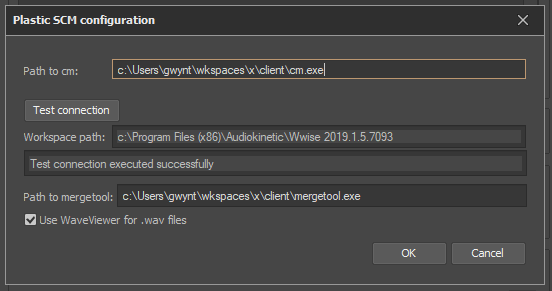
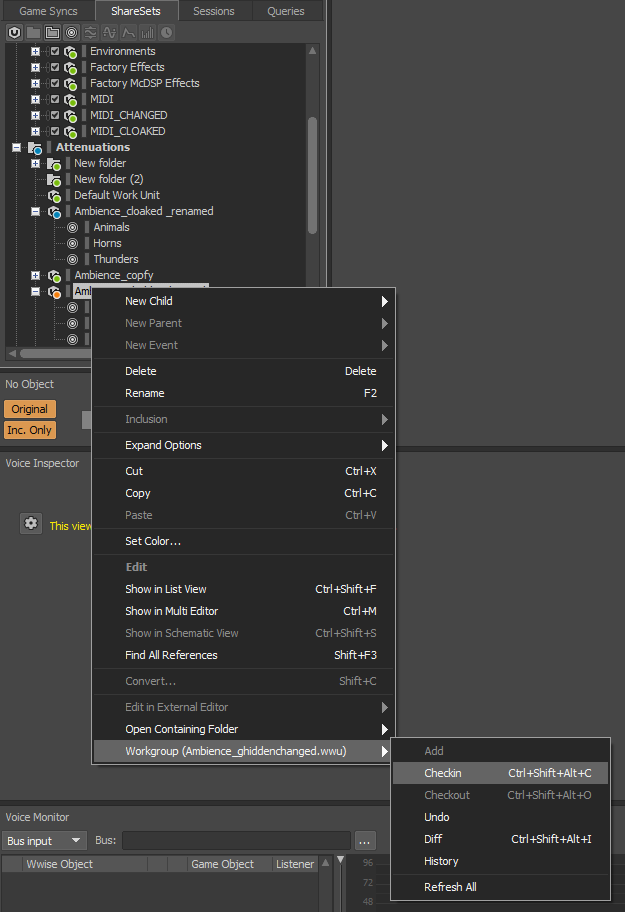
Plastic SCM Plugin for Wwise: We are pleased to announce the first release of the Plastic SCM Plugin for Wwise. Wwise users can get Plastic source control functionality from within the application.
To use the Plastic SCM Plugin for Wwise, you have to copy the plugin dll from your Plastic SCM client install directory to the following location in your Wwise install:
```text
/Authoring/x64/Release/bin/SourceControl
```
Where `` is usually something like `C:\Program Files (x86)\Audiokinetic\Wwise 2019.1.X.YYYY`.
Configuration:
1. In "Project" menu, open "Project Settings...".
2. In the "General" tab, "Workgroup" -> "Plug-in" combo, select "Plastic SCM".
3. Click "Config...".
4. Here you can set the path to the `cm.exe`. If left blank it will pick up any cm on the system `%PATH%`.
5. Click "Test connection" to check the setup.
6. If the cm path is correct AND the project is in a Plastic workspace, you should see the message "Test connection executed successfully".
7. If you see "No workspace found for project", check that the project is in a workspace.
8. If you see "Failed to start Plastic SCM Shell Process." Check the cm path.
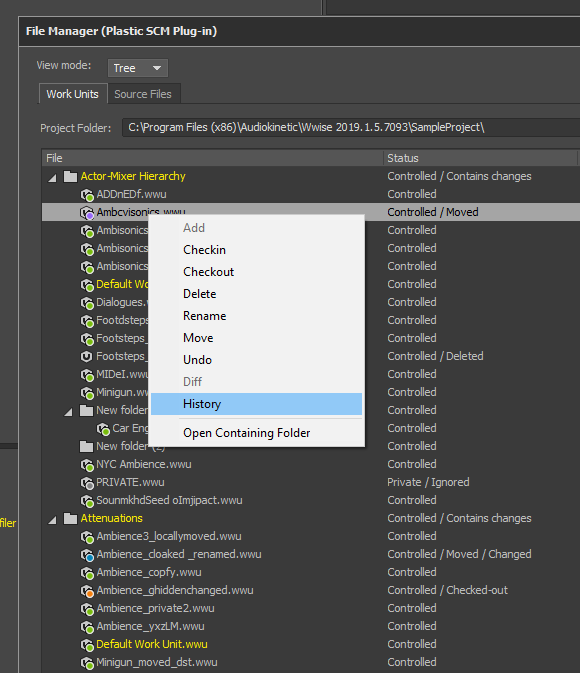
Here are some screenshots:
**Screenshot:**
**Screenshot:**
**Screenshot:**
### Bug
#### All platforms - Server
All platforms - Server: Experimental Lz4 decompression could enter into a death loop.
This is not a critical issue since we didn't enable Lz4 network compression by default yet.
We detected that when the client (using Lz4) closed the socket, the server side could enter into a tight loop trying to continue reading bytes and burning CPU (empty loop trying to read again and again). That's now fixed!
#### Windows - Plastic
Windows - Plastic: We increased the initial width of the Repository Explorer dialog so its controls don't overlap. This dialog allows you to select the target repository in the "New workspace" dialog.
#### All platforms - Proxy server
All platforms - Proxy server: The proxy server didn't handle revisions with missing data right. This is a common scenario if you replicate branches to a repository using the `--nodata` flag (which we call "dehydrated replica").
In this case, the proxy server didn't do anything special during download. It considered those revision data to be already downloaded but the expected cache didn't exist on disk... so the proxy server thought that the missing files weren't there because a cache cleanup and retried the download three times. This meant an unnecessary delay of 1.5 seconds in total.
The proxy server will now know about this scenario and return quickly so the client can talk directly to the server.
***
## 8.0.16.3922
> **Note:**
>
> **Public** | 2020-01-31
### New
#### Command line client
Command line client: We edited the explanation of the `cm attribute edit` command to show you how to specify a default list of values for an attribute. We also included an example to be clearer.
#### All platforms - Server
All platforms - Server: Improved the `ChannelCall` log with more details:
* Added `mt` (method time) to plasticproto, it was always zero before.
* Changed `prt` (process time, basically request time) in remoting to measure the entire request, now it is comparable to plasticproto.
* Added precise tracking to network times (millisecond precision) and lz4 compression/decompression
* Plastic Protocol and Remoting calls are now easier to compare - they are properly aligned!
```text
2020-01-24 15:45:17,495 21 (null) INFO ChannelCall - conn: 2 protocol:plasticproto sec:none recb: 21|rect: 0|sentb: 4232249|sendt: 17|queuedt: 0|prt: 203|th: 21|dest: 0|mt: 0|sert: 186|zip: 0|cpu: 203| 127.0.0.1|user:pablo|GetChangesetTree
2020-01-24 15:45:49,187 24 (null) INFO ChannelCall - conn: 3 protocol: remoting sec:none recb: 762|rect: 0|sentb: 5835118|sendt: 3|queuedt: 0|prt: 62|th: 24|dest: 0|mt: 0|sert: 47|zip: 0|cpu: 62| 127.0.0.1|user:pablo|GetChangesetTree
```
#### All platforms - Server
All platforms - Server: Serialization in Plastic protocol improved even more.
We are working on performance to boost Plastic Protocol performance as much as we can. Starting from this release, Plastic Protocol will serialize data (big trees) faster than remoting. We still need to add a buffer pool but this will come soon.
#### All platforms - Server
All platforms - Server: We optimized the Plastic Protocol serialization performance.
We use a binary protocol for network serialization that we called Plastic Protocol. We still have an ancient one called Remoting. We found out that remoting was serializing trees (and metadata in general) faster, due to the way we serialize in Plastic Protocol.
The problem was an intermediate buffer we used to group metadata before sending it to the network. Writing to it was slow and it was killing performance.
We fixed it and now serialization time in Plastic Protocol is as good as Remoting. It means that Plastic Protocol calls (the defaults) are now consistently faster than Remoting.
With the test trees we used:
* Before: Remoting needed 31-47 ms to serialize a 5MB tree. Plasticproto needed 87-113.
* After: Plasticproto is now 40-50 ms. We still have some room for improvement. But, since remoting sends more data (less effective protocol), Plasticproto should be consistently faster now.
#### All platforms - Server, Plastic, Command line client
All platforms - Server, Plastic, Command line client: We changed a message for when SSL negotiation fails.
Before, we printed:
```text
Server yourserver:8084 does not support SSL.
```
Whilst now it says:
```text
SSL negotiation with server yourserver:8084 failed.
```
And it will print extra info if possible.
We found this while debugging some unit tests that failed sporadically, and we thought it would be good in production too.
#### macOS - Plastic
macOS - Plastic: Great news! You'll notice that branch code reviews now allow you to review changeset by changeset! There is a new switcher in the upper left corner of the window that enables you to switch back and forth between this new mode and the already supported "entire branch" review.
Selecting a changeset in the list will recalculate the changes you see in the upper right panel so you can diff any of them. This provides a quick way to go through all changes in the branch you're reviewing.
We're really excited about this, as we encourage our users to review their peers changeset by changeset. This provides a better insight about what the developer had in their mind and their thought process.
You can see it in action in [this video we recorded for you](https://imgur.com/a/qEJWtTD). We hope you'll like this as much as we do!
### Bug
#### All platforms - Plastic
All platforms - Plastic: Workspaces pointing to Cloud repositories did not support Global Configuration. There were invalid characters in the name of the workspace pointing to the global configuration (the `@` bit). That's fixed now! You can create and use your plastic-global-config repository in the Cloud.
You can read more about Global Configuration in the [documentation](https://www.plasticscm.com/documentation/administration/plastic-scm-version-control-administrator-guide#Globalfileconfiguration)
#### All platforms - Plastic
All platforms - Plastic: The Pending Changes view did not show cloaked controlled changes (e.g. after performing a merge operation that involved them). It is fixed now!
#### Windows - Plastic
Windows - Plastic: Closing a Plastic view while loading its content could break the workspace metadata under very specific concurrency circumstances. That left the workspace pointing to the changeset 0 and created files `plastic.wktree.bak` and `plastic.changes.bak` inside the workspace metadata folder (`$workspace_root/.plastic`).
Using different Plastic clients concurrently (e.g. Plastic GUI, cm CLI, Visual Studio Plugin or Unreal plugin) increased the chances of hitting this issue.
This happened because we handled the abort exception as an actual problem reading the workspace tree. Now it's fixed.
***
## 8.0.16.3911
> **Note:**
>
> **Public** | 2020-01-28
### New
#### macOS - Plastic
macOS - Plastic: The new Code Review system now allows you to visualize comments located in revisions that aren't loaded in the code review window. For example, this happens when you checked in new changes to apply revision comments. That creates new revisions for those files in the same branch, which don't match the commented revisions. When this happens, we display a panel with three actions:
* Diff revision with comments: Compares the commented revision (right side) with the base one (left side).
* Last in branch: Compares the last revision in the branch (right side) with the base one (left side). This is what selecting a file in the changes tree does.
* Diff with head: Compares the last revision in the branch (right side) with the commented revision (right side).
Please remember that the Code Review feature is still beta in macOS. Feel free to share your feedback with us!
#### Windows, macOS - Plastic
Windows, macOS - Plastic: Checking in your changes will refresh the branch diff in opened code review windows now. This allows you to have the current information in your code review windows. Nobody likes stale data, right?
### Bug
#### Windows - Gluon
Windows - Gluon: The Checkin view didn't recalculate the diffs of the selected file after refresh. Now it does!
#### All platforms - WebAdmin
All platforms - WebAdmin: there were some aesthetic issues in the Performance section. When browsing with Firefox, the numbers were cut out. Now it's fixed!
***
## 8.0.16.3899
> **Note:**
>
> **Public** | 2020-01-24
### New
#### All platforms - Command line client
All platforms - Command line client: We edited the 'cm pull hydrate' example explanation. It now highlights that this command introduces the missing data for all the changesets in a branch. Also, the 'cm pull' command now includes an example of how to hydrate a changeset.
#### Server, Command line client, Plastic Gluon, Unity 3D plugin, Proxy server
All platforms - Server, Command line client, Plastic, Gluon, Unity3D plugin, Proxy server: We improved how Plastic (client and server) manages memory buffers. Our new changes will prevent Plastic from getting out of resources in its pools, also improving the response times under heavy load.
#### All platforms - Gluon
All platforms - Gluon: The Checkin view menu has a new item: "Checkout"! It will put locally changed items under explicit version control. For instance, if you right-click a locally changed item and select "Checkout", that item will checked-out from that moment on. Private files will become Added, etc. This menu item behaves like the one with the same name in the Pending Changes view of Plastic.
### Bug
#### Windows - Plastic
Windows - Plastic: The Branch Explorer highlights search results in yellow, with the focused result in orange. Because of a bug, the focused search result was losing its orange color after a refresh. Now it's fixed.
#### macOS, Linux - Plastic, Gluon, Command line client
macOS, Linux - Plastic, Gluon, Command line client: Under some circumstances, move detection did not always work on \*NIX systems. We could only reproduce this issue in Virtual Machines where the guest is one of these OSs, so you probably never encountered it - rest your mind knowing that it is fixed. Now let's dive into the details:
Let's say that you have the following workspace configuration:
```text
/fileA.txt - CONTROLLED
/fileB.txt - CONTROLLED
/fileC.txt - CONTROLLED
/fileD.txt - PRIVATE
```
Now you move `fileA.txt` to `fileE.txt`. We will have this scenario:
```text
/fileA.txt - LOCALLY DELETED
/fileB.txt - CONTROLLED
/fileC.txt - CONTROLLED
/fileD.txt - PRIVATE
/fileE.txt - PRIVATE
```
We want to know if `fileA.txt` is actually `fileD.txt` or `fileE.txt` (or even neither of those), so we need to compare `[A <> D]` and `[A <> E]` to determine that. Once we determine through comparisons that A and E are the same file with different name, we have enough information to have this scenario:
```text
/fileE.txt - LOCALLY MOVED (src: /fileA.txt)
/fileB.txt - CONTROLLED
/fileC.txt - CONTROLLED
/fileD.txt - PRIVATE
```
...and in an ideal world is that easy. But now imagine that we have thousands of private files. We can't compare A with those thousands of files to determine the local move operation fast enough. So, in order to reduce the number of files we need to compare against, one of the filters we apply is the timestamp of the file. And if we lose timestamp precision because of the underlying File System in any of the operations involved, move detection breaks! Now, it is fixed.
#### All platforms - Server
All platforms - Server: ChannelCall incorrectly printed `sec:none` after the first method call with SSL.
In the ChannelCall log, after a connection attended the first request, next ones printed this:
```text
ChannelCall - conn: 340 protocol:remoting sec:none recb: 741|r
```
The `sec:none` bit was not correct because they were indeed SSL calls. Now it is fixed!
(This was NOT a security issue, just a log issue!)
***
## 8.0.16.3887
> **Note:**
>
> **Public** | 2020-01-20
### New
#### Windows - Gluon
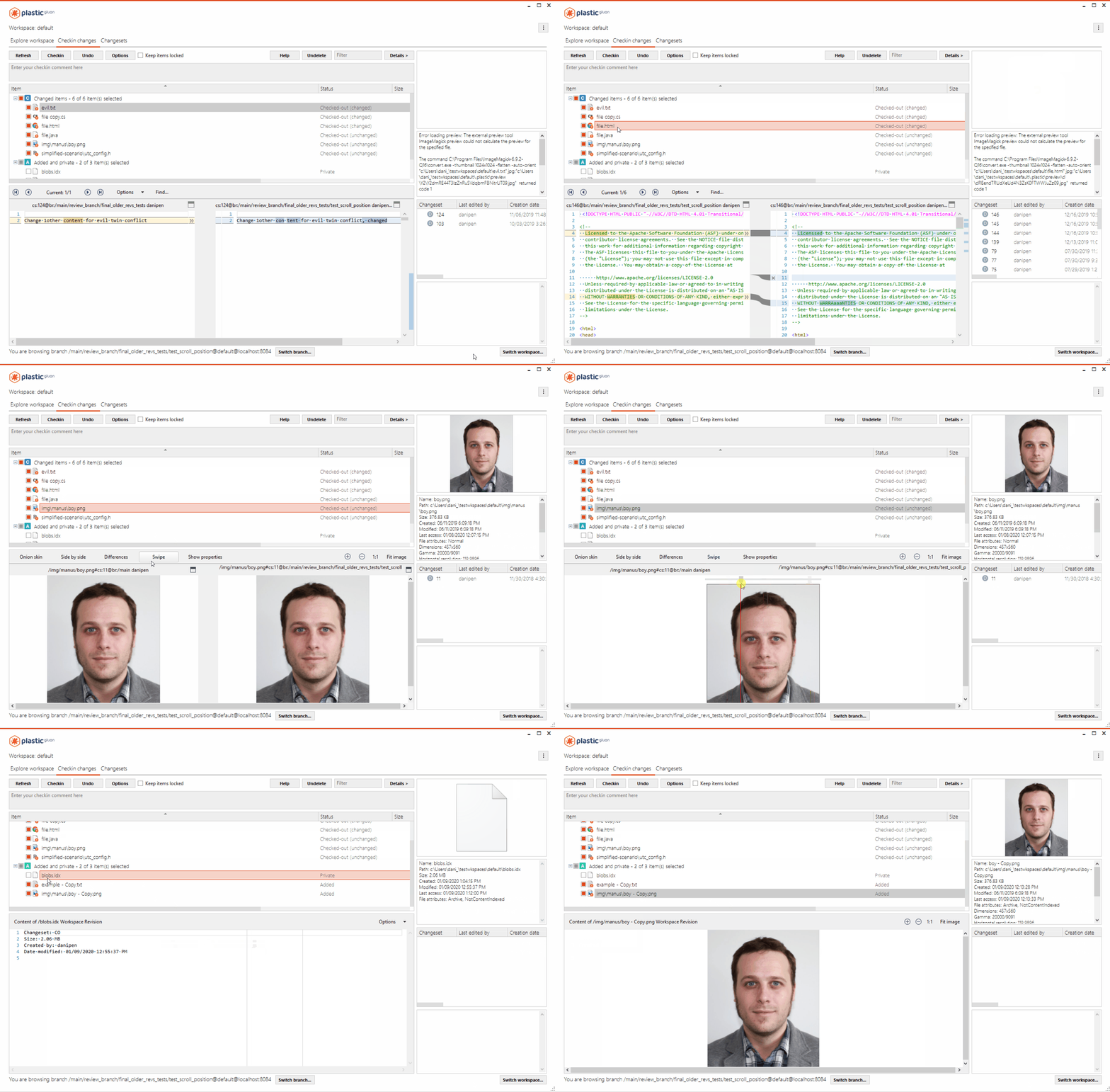
Windows - Gluon: Added the embedded diff viewer in the "Checkin changes" view.
When you select a file in the "Checkin changes" view, the differences appear in a panel at the bottom of the window (or the file content, when it's an added / moved / deleted file).
These are the file formats supported by the viewers:
* Text diffs
* Semantic diffs for [supported languages](http://semanticmerge.com/features/#language-support)
* Image diffs
* Binary diffs (we display the file metadata).
See it in action:
**Screenshot:**
#### Windows - Plastic
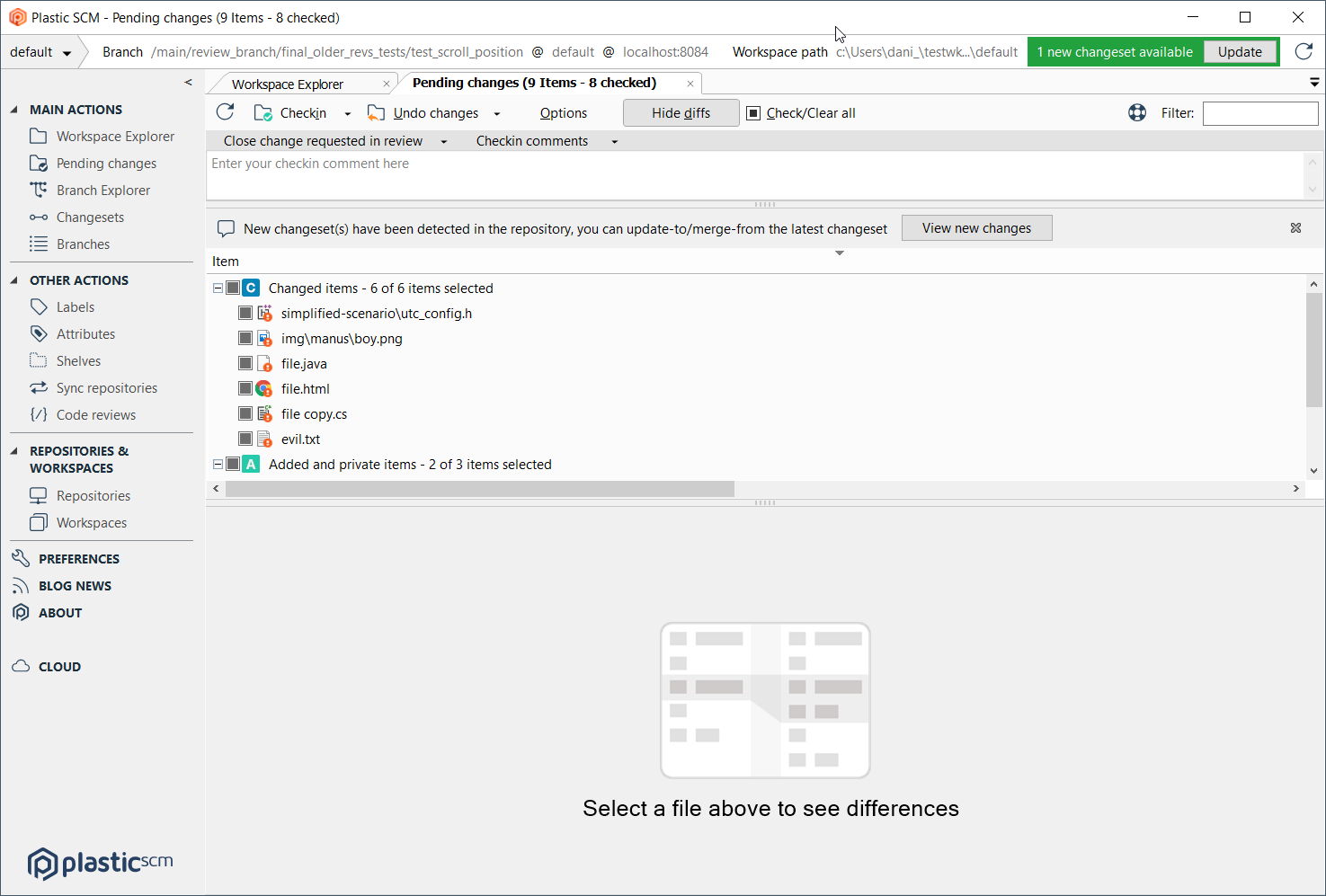
Windows - Plastic: When there is no item selected in the pending changes view, we display the following improved empty state:
**Screenshot:**
#### All platforms - Command line client
All platforms - Command line client: We changed the usage of the "cm update" and "cm partial update" commands to make clearer which arguments are optional (i.e. those that can be omitted).
#### All platforms - Command line client
All platforms - Command line client: Now you can just run `cm update` to update the full workspace. The workspace root path is no longer needed. You don't need lines like `cm update $wk_root_path` or `cm update .` anymore.
#### All platforms - Plastic
All platforms - Plastic: We improved how the merge operation solves multiple directory conflicts. Before these changes, any conflict that Plastic SCM couldn't apply caused the operation to stop. Now, the merge will continue solving any remaining conflicts.
Additionally, the operation retries all failed conflicts at the end. Directory conflict resolution might fail because it depends on another conflict resolution. That's why it makes sense to try again, so Plastic can smoothly apply it at the end.
Let's see a case.
Base content:
```text
/PS4
/PS4/settings
/PS4/settings/Center.xml
/XboxOne
/XboxOne/settings
/XboxOne/settings/Center.xml
/Windows
/Windows/settings
```
Source changes:
```text
mv /PS4/settings/Center.xml /Windows/settings/Center.xml
```
Destination changes:
```text
mv /Xbox/settings/Center.xml /Windows/settings/Center.xml
rm /PS4
```
This merge has 2 conflicts:
* Move evil twin conflict: /Windows/settings/Center.xml
* Move/Deleted conflict: /Windows/settings/Center.xml
Before this improvement, first you needed to resolve the Move/Deleted conflict in order to choose source as resolution for both. Now you can resolve both conflicts at the same time.
#### All platforms - Server
All platforms - Server: We noticed that our trunkbot kept notifying that there is no CI system configured if you skipped that step during setup. This happened for every processed branch. That's annoying! You don't really need to know that something did *not* run if you explicitly configured it that way, right? Well, we fixed it!
### Bug
#### All platforms - Plastic, Command line client
All platforms - Plastic, Command line client: Some complex merge cases failed, showing errors like the following: `The item '/bdwgc/cord/tests/de_cmds.h' cannot be restored because it had changes in it when it was deleted. Please undo the pending changes and repeat the merge without pending changes or with another conflict resolution.`. This happened even though there were no pending changes before starting the merge. Now it's working.
This is a sample scenario that reproduced the issue:
Base contents:
```text
/boehmgc
/boehmgc/cord
/boehmgc/cord/tests
/boehmgc/cord/tests/de_win.h
/boehmgc/cord/tests/de_cmds.h
/bdwgc
```
Source changes:
```text
add /bdwgc/cord
add /bdwgc/cord/tests
mv /boehmgc/cord/tests/de_cmds.h /bdwgc/cord/tests/de_cmds.h
rm /boehmgc
```
Destination changes:
```text
add /bdwgc/cord
add /bdwgc/cord/tests
mv /boehmgc/cord/tests/de_win.h /bdwgc/cord/tests/de_win.h
edit /bdwgc/cord/tests/de_win.h
mv /boehmgc/cord/tests/de_cmds.h /bdwgc/cord/tests/de_cmds.h
rm /boehmgc
```
The error appeared when you chose to keep the source contributor for all directory conflicts.
#### All platforms - Plastic, Command line client
All platforms - Plastic, Command line client: Some complex merge cases failed, showing errors like the following: `The following merge operations cannot be applied: M "c:/tmp/SCM14918/boehmgc/cord/tests/middle.c" "c:/tmp/SCM14918/bdwgc/cord/tests/middle.c" - Error: "Item cannot be moved because it cannot be found."`
We fixed that. This is an scenario that reproduced the issue:
Base content:
```text
/boehmgc
/boehmgc/cord
/boehmgc/cord/tests
/boehmgc/cord/tests/de_win.h
/boehmgc/cord/tests/de_cmds.h
/boehmgc/cord/tests/middle.c
/bdwgc
```
Source changes:
```text
add /bdwgc/cord
add /bdwgc/cord/tests
mv /boehmgc/cord/tests/de_cmds.h /bdwgc/cord/tests/de_cmds.h
mv /boehmgc/cord/tests/middle.c /bdwgc/cord/tests/middle.c
rm /boehmgc
```
Destination changes:
```text
add /bdwgc/cord
add /bdwgc/cord/tests
mv /boehmgc/cord/tests/de_win.h /bdwgc/cord/tests/de_win.h
edit /bdwgc/cord/tests/de_win.h
mv /boehmgc/cord/tests/de_cmds.h /bdwgc/cord/tests/de_cmds.h
rm /boehmgc
```
The error appeared when you chose to keep the source contributor for all directory conflicts.
#### All platforms - Server
All platforms - Server: Some complex merge-to cases failed, showing errors like the following: `Can't add an entry with the same name. Duplicated child [head.png]. Parent [art]`. Now it's fixed.
Base content:
```text
/art
/art/data
/art/data/face.png
```
Source changes:
```text
add /art/head.png
rm /art/data
```
Destination changes:
```text
mv /art/data/face.png /art/head.png
edit /art/head.png
rm /art/data/UnityExtensions/Unity/Timeline
```
The error appeared during the merge-to resolution when you chose to keep the source contributor for all directory conflicts.
#### Windows - Plastic
Windows - Plastic: After resizing the Plastic window, sometimes the diff scroll was unable to reach the textbox botton, due to a scrollbar metrics issue. Now it's fixed.
***
## 8.0.16.3880
> **Note:**
>
> **Public** | 2020-01-14
### New
#### Command line client
Command line client: have you ever wanted to see the status of your cloaked items using the CLI? Of course you have. And now you can! Use the new "--cloaked" flag of "cm status".
The normal status output denotes cloaked items with `Cloaked`. The machine readable output denotes this items with `CL`.
Example:
```console
c:/wks/cloaked>cm status --cloaked
/main@cloaked@localhost:8084 (cs:23 - head)
Changed
Status Size Last Modified Path
Changed / Cloaked 6.25 KB 5 days ago Ambience_cloaked.wwu
Changed 1.75 KB 20 days ago Car Engine.wwu
Deleted
Status Size Path
Removed / Cloaked 69.02 KB Factory Effects.wwu
Added
Status Size Last Modified Path
Private 111 bytes 4 days ago cloaked.conf
Added / Cloaked 0 bytes 4 days ago newcloaked.txt
c:/wks/cloaked>cm status --cloaked --machinereadable
STATUS 23 wwise localhost:8084
CH+CL c:/wks/cloaked/Ambience_cloaked.wwu False NO_MERGES
DE+CL c:/wks/cloaked/Factory Effects.wwu False NO_MERGES
AD+CL c:/wks/cloaked/newcloaked.txt False NO_MERGES
CH c:/wks/cloaked/Car Engine.wwu False NO_MERGES
PR c:/wks/cloaked/cloaked.conf False NO_MERGES
```
#### Command line client
Command line client: We added a new code, "HC", to the machine-readable output of "cm status". It denotes files or directories included in the hidden\_changes.conf filter.
Example:
```console
c:/wks/hiddenchanges>cm status --hiddenchanged --machinereadable
STATUS 23 wwise localhost:8084
CH+HC c:/wks/hiddenchanges/Ambience_hiddenchanged.wwu False NO_MERGES
```
### Bug
#### All platforms - Plastic
All platforms - Plastic: Diff failed with no-data replicated branches.
You replicate a branch with no-data and then the diff failed because it wasn't able to locate the original data.
Back in 8.0.16.3046 we made improvements in the diff to avoid showing "empty contents". It was a concurrency problem. Unfortunately, we broke the diff for nodata (data not downloaded to the repo, only metadata) and it refused to show the diffs loading missing contents from the original server.
#### Windows - Plastic
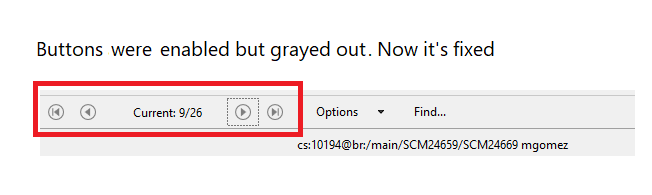
Windows - Plastic: After disabling and re-enabling a button in the GUI, the icon color could denote that the button was still disabled. This color remained until an application restart. Now it's fixed!
**Screenshot:**
#### Windows - Plastic
Windows - Plastic: If you tried to close the Sync view while it is loading, it could make Plastic to crash and close. Now it's fixed.